Building a Serverless Voice Notes App on AWS
After passing the AWS Cloud Practitioner exam in early 2025, I started studying for the Solutions Architect Associate. Two weeks in, I noticed I was memorizing service names but not understanding how they connect. So I decided to build something real.
A friend of mine keeps bees. He walks around his hives, notices things, queen activity, honey production, signs of disease, and forgets half of it by the time he gets home. He needed a way to record voice notes in the field and review them later. I needed a project that would force me to wire up multiple AWS services end-to-end.
This post walks through how I built VosakAI, what each piece does, how they connect, and where the real learning happened.
The Architecture
The app records audio on a phone, uploads it to S3, transcribes it with AWS Transcribe, and serves the results back through an API. Seven steps, six AWS services.
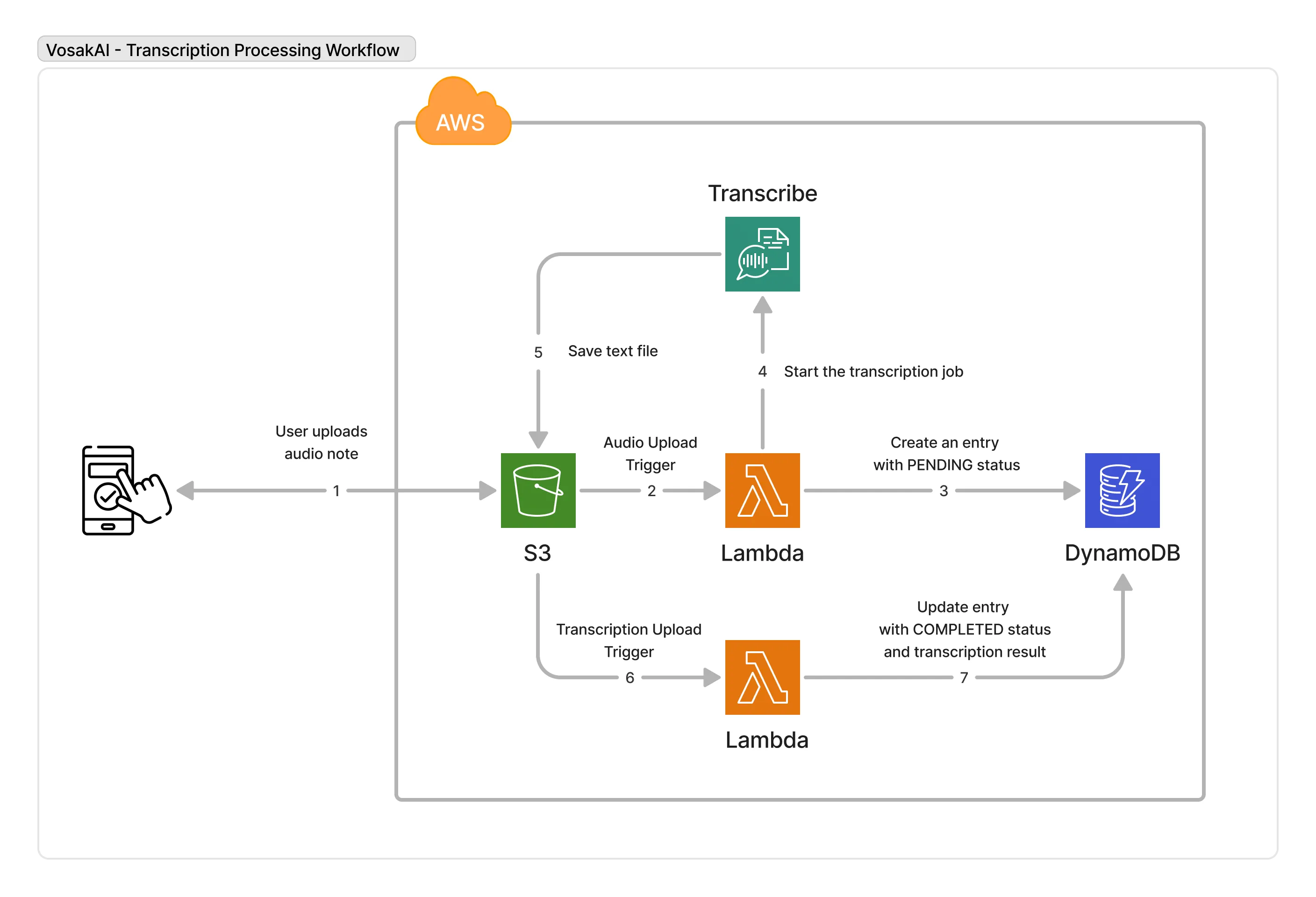
Upload to S3, start transcription, store the result in DynamoDB, and serve it back through an API.
Services used:
- S3 stores audio files and transcription results
- Lambda runs two functions that orchestrate the pipeline
- AWS Transcribe converts audio to text
- DynamoDB stores note metadata and transcription results
- API Gateway serves data to the mobile app
- Cognito handles user authentication and S3 access permissions
Frontend: React Native with Expo, built with Cursor.
Step 1: Authentication with Cognito
Users need to log in before they can record or view anything. I used AWS Cognito, which does two separate things.
User Pools manage accounts: signup, login, password reset, and email verification. You create a User Pool, get a Pool ID and App Client ID, and point your app at it.
Identity Pools are different. They exchange a Cognito login token for temporary AWS credentials through STS. This lets the mobile app upload files directly to S3 without going through a backend. The app gets scoped permissions so it can only write to a specific S3 path tied to the user’s identity.
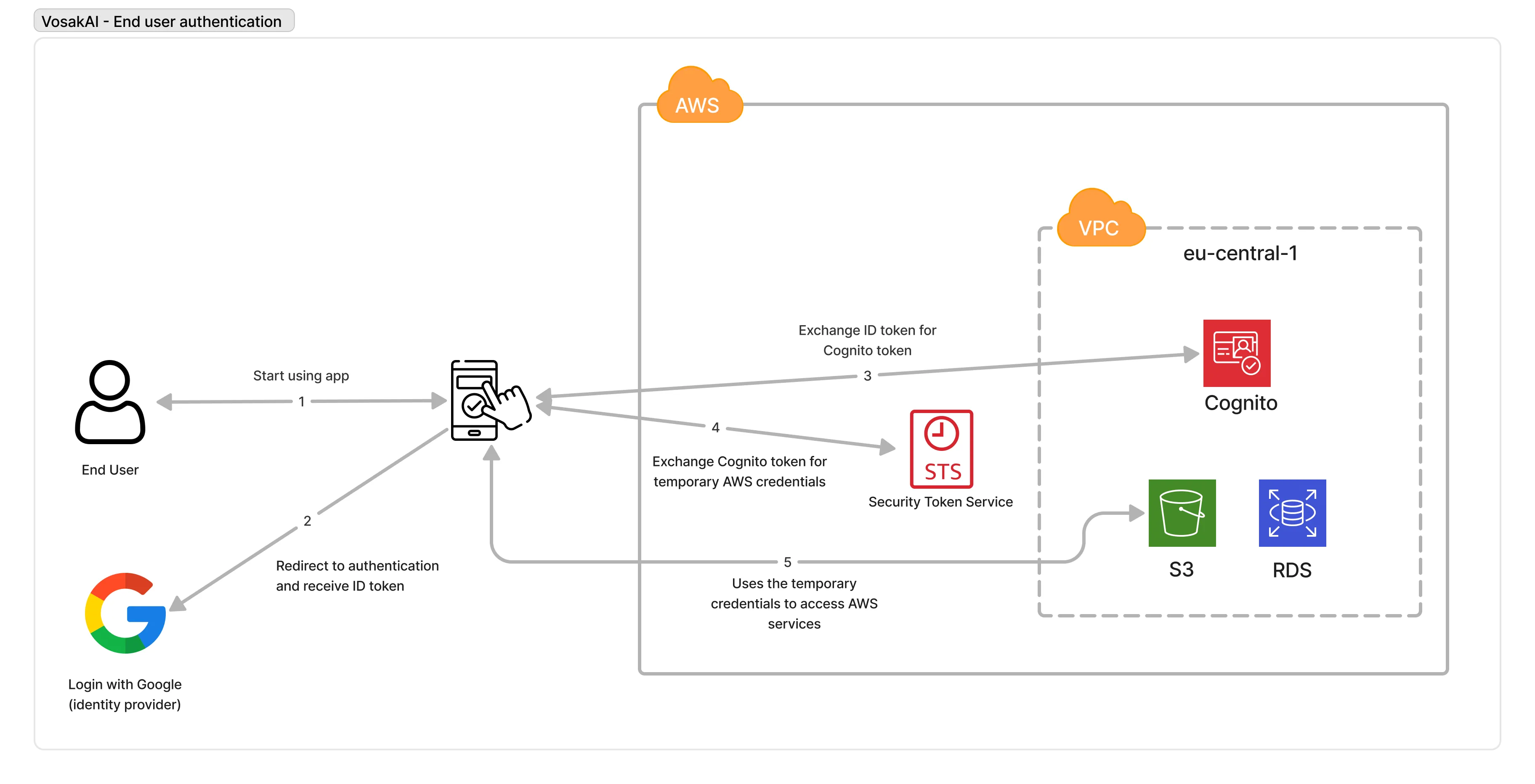
Login, get a Cognito token, exchange it for temporary AWS credentials, then use those credentials to talk to S3.
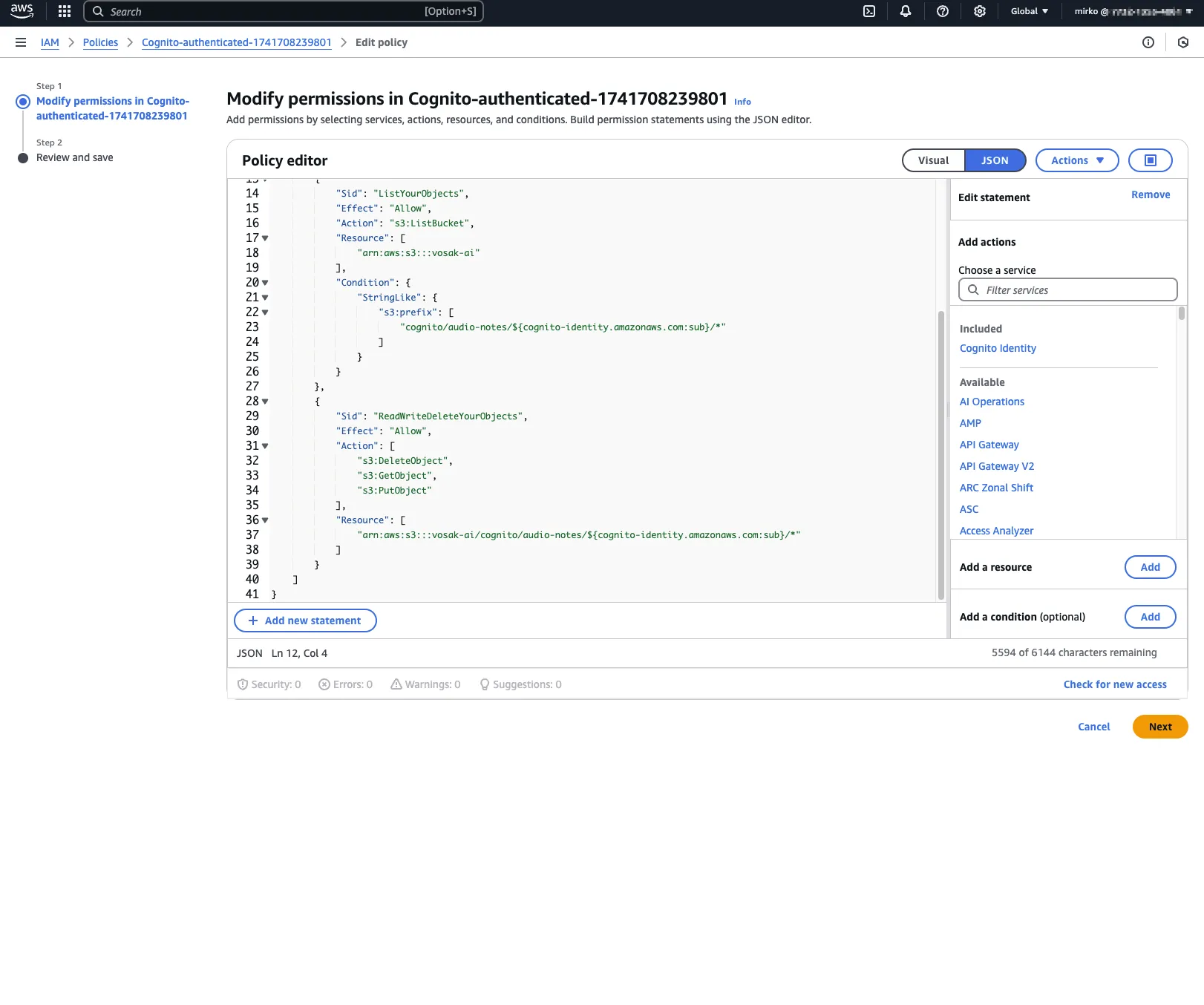
IAM policy attached to the authenticated Cognito role. The user gets access only to their own S3 object path.
On the app side, I used Amplify’s Authenticator component for the login and signup UI.
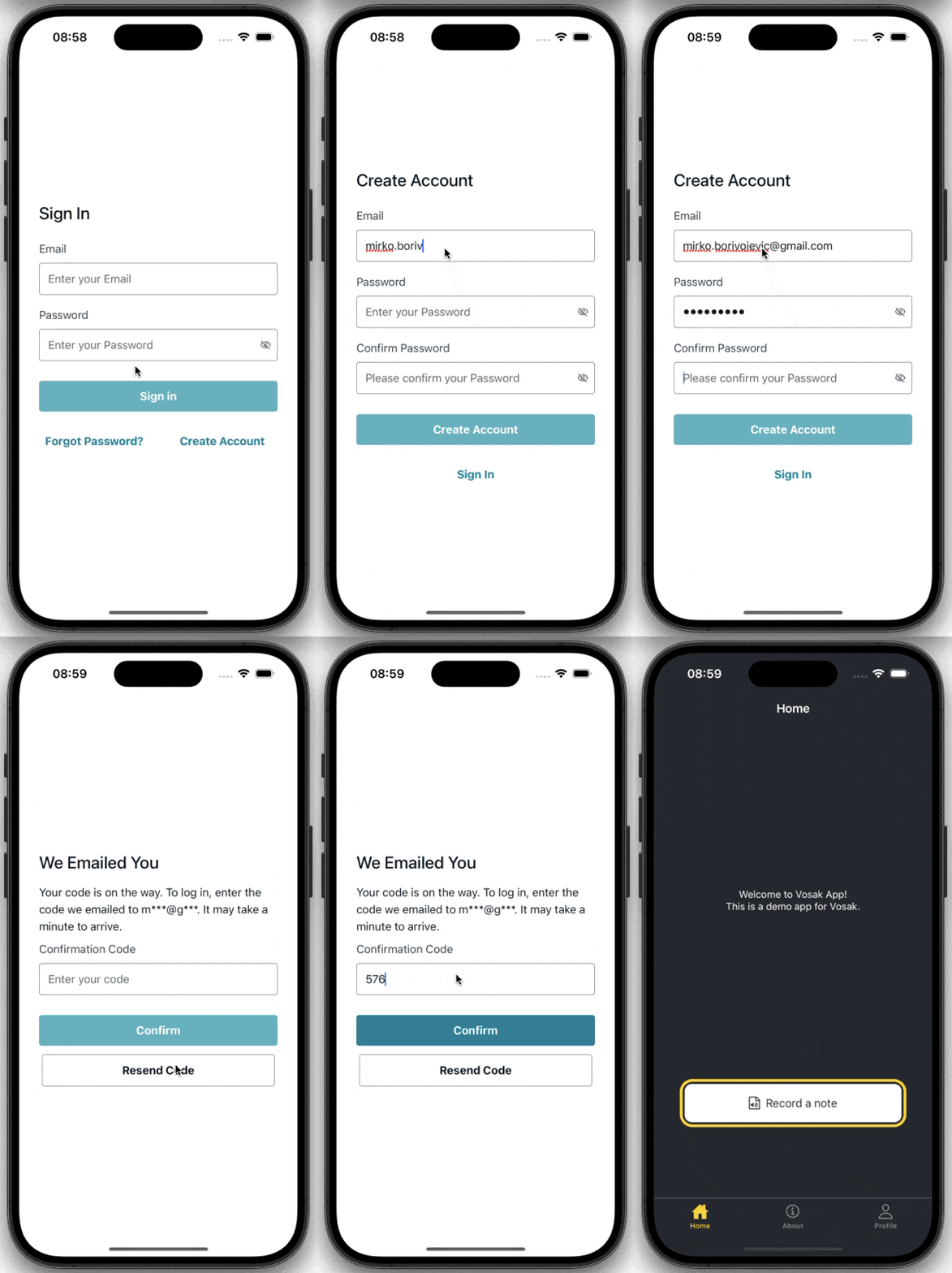
Sign-in flow in the Expo app.
The Amplify config connects both pools:
Amplify.configure({
  Auth: {
    Cognito: {
      userPoolId: 'eu-central-1_xxxxx',
      userPoolClientId: 'xxxxx',
      identityPoolId: 'eu-central-1:xxxxx-xxxxx',
    },
  },
  Storage: {
    S3: {
      bucket: 'vosak-ai',
      region: 'eu-central-1',
    },
  },
});
That split between User Pools and Identity Pools was one of the first practical AWS lessons in the project. Authentication and authorization are related, but they are not the same thing. Cognito makes that distinction very explicit.
Step 2: Recording Audio and Uploading to S3
The app uses expo-av for audio recording. Tap record, it asks for microphone permissions, starts recording, and stores the file locally. Stop recording, it uploads to S3 through Amplify’s Storage module.
The S3 path follows a convention: cognito/audio-notes/{username}/{timestamp}.m4a. Each user’s files stay separate.
const uploadToS3 = async (uri, fileName) => {
  const response = await fetch(uri);
  const blob = await response.blob();

  await uploadData({
    key: `audio-notes/${username}/${fileName}`,
    data: blob,
    options: { contentType: 'audio/m4a' },
  });
};
The upload goes directly from the phone to S3, no backend involved. The temporary credentials from the Identity Pool give the app PutObject permission, but only under the user’s path.
That direct upload path matters because it removes a whole class of backend complexity. No API endpoint has to accept a multipart upload, no server has to buffer large files, and no custom token exchange layer sits in the middle. The phone gets temporary credentials and writes the file straight to the bucket.
Step 3: Lambda 1, Start Transcription
When an audio file lands in S3, an event notification triggers the first Lambda function. It does two things:
- Creates a DynamoDB entry with
TranscriptionStatus: PENDING - Starts an AWS Transcribe job pointing at the uploaded file
await dynamoClient.send(
  new PutCommand({
    TableName: 'audio-notes',
    Item: {
      ItemID: fileId,
      ItemType: 'FILE',
      Name: fileName,
      TranscriptionStatus: 'PENDING',
      UploadTimestamp: new Date().toISOString(),
    },
  })
);

await transcribeClient.send(
  new StartTranscriptionJobCommand({
    TranscriptionJobName: `transcribe-${Date.now()}-${Math.random()}`,
    LanguageCode: 'en-US',
    Media: { MediaFileUri: `s3://vosak-ai/${audioKey}` },
    OutputBucketName: 'vosak-ai',
    OutputKey: `transcriptions/${fileName}.json`,
  })
);
The execution role needs s3:GetObject, dynamodb:PutItem, and transcribe:StartTranscriptionJob. Getting these IAM policies right took more time than writing the actual function.
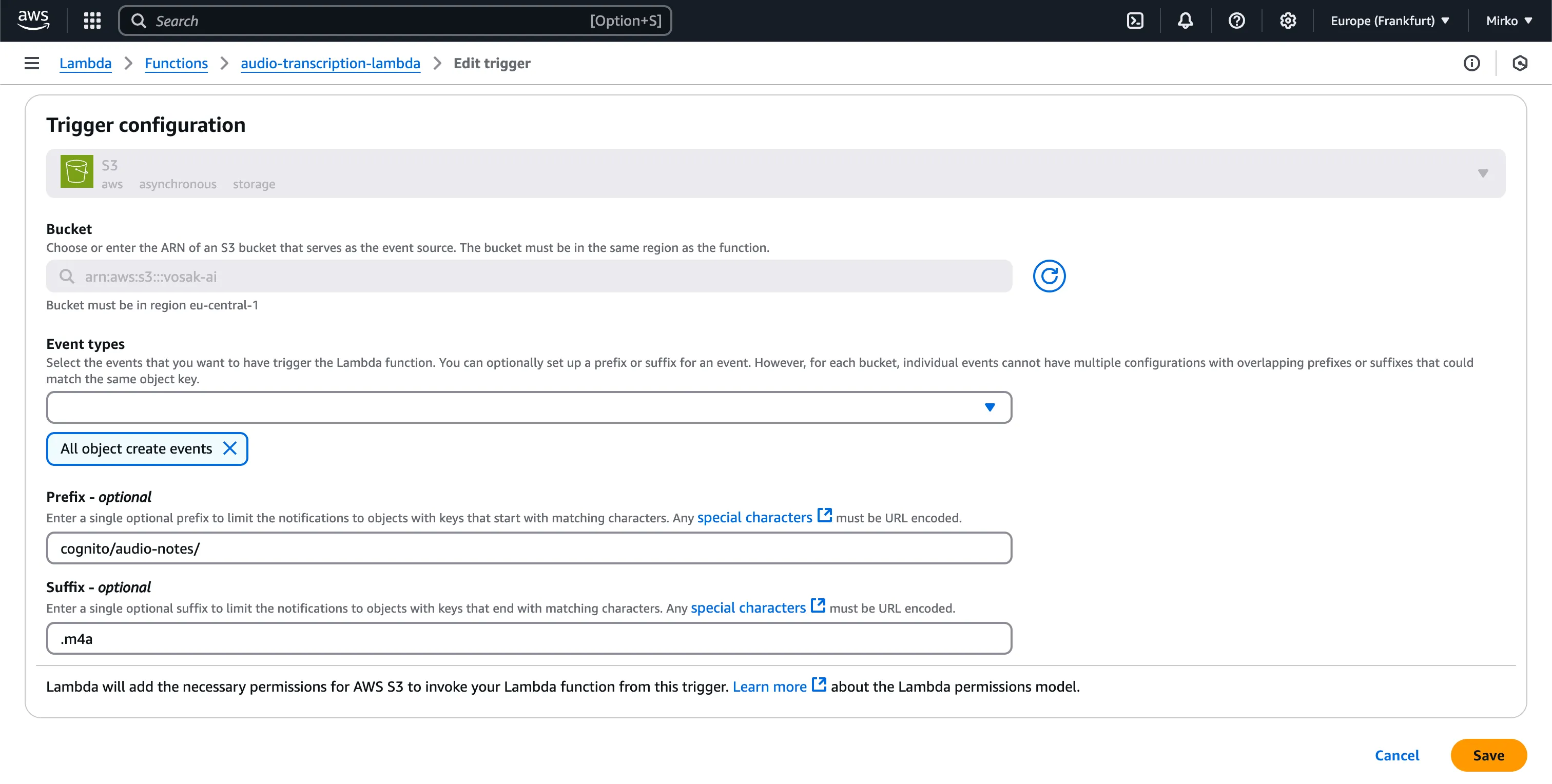
The first Lambda is triggered by object creation events under the cognito/audio-notes/ prefix with an .m4a suffix.
This is one of those places where serverless feels deceptively simple. The function code was straightforward. The real work was configuring event routing, IAM permissions, and bucket prefix conventions so the pipeline did the right thing automatically.
Step 4: AWS Transcribe
Transcribe runs asynchronously. It picks up the audio file, processes it, and writes the result as JSON back to S3. Nothing to code here; you configure the job in Step 3 and Transcribe does the rest. Output goes to transcriptions/{filename}.json.
That asynchronous boundary is useful. The mobile app does not need to stay connected while the transcription finishes, and Lambda 1 does not need to poll for completion. It simply kicks off the job and exits.
Step 5: Lambda 2, Save the Result
When Transcribe writes the result JSON to S3, a second S3 event triggers Lambda 2:
- Reads the JSON from S3
- Extracts the transcription text
- Updates the DynamoDB entry and marks status as
COMPLETED
const s3Response = await s3Client.send(
  new GetObjectCommand({
    Bucket: 'vosak-ai',
    Key: transcriptionKey,
  })
);

const result = JSON.parse(await s3Response.Body.transformToString());
const transcript = result.results.transcripts[0].transcript;

await dynamoClient.send(
  new UpdateCommand({
    TableName: 'audio-notes',
    Key: { ItemID: fileId, ItemType: 'FILE' },
    UpdateExpression:
      'SET TranscriptionStatus = :s, TranscriptionResult = :r, ProcessingTimestamp = :t',
    ExpressionAttributeValues: {
      ':s': 'COMPLETED',
      ':r': transcript,
      ':t': new Date().toISOString(),
    },
  })
);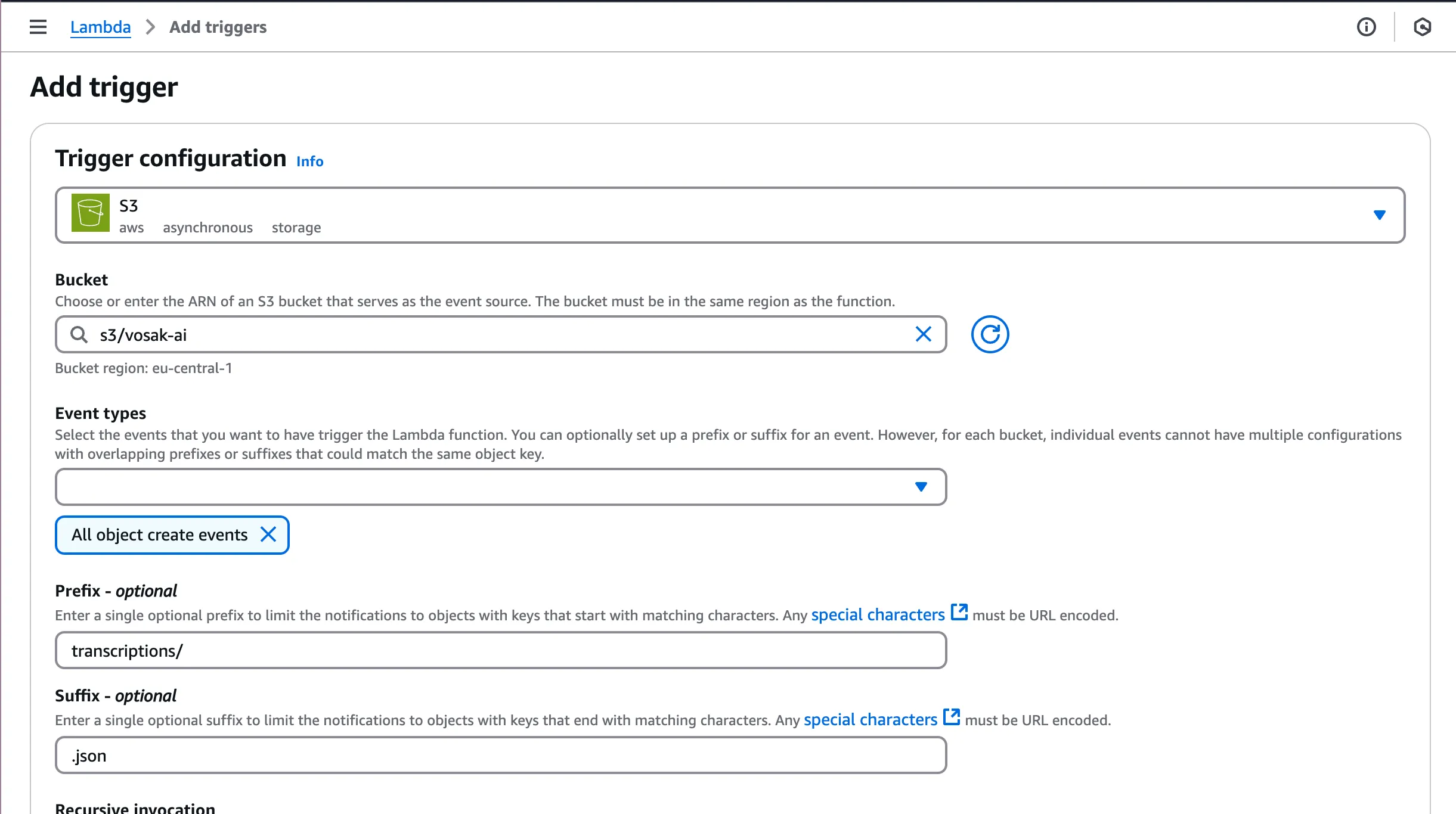
The second Lambda fires when a .json file appears under the transcriptions/ prefix.
This second Lambda closes the loop. DynamoDB starts with a placeholder row, then gets enriched once Transcribe finishes. That lets the app render status immediately instead of pretending work is synchronous when it is not.
Step 6: DynamoDB Table Design
The table stores note metadata, transcription status, and results. I used NoSQL Workbench to model it.
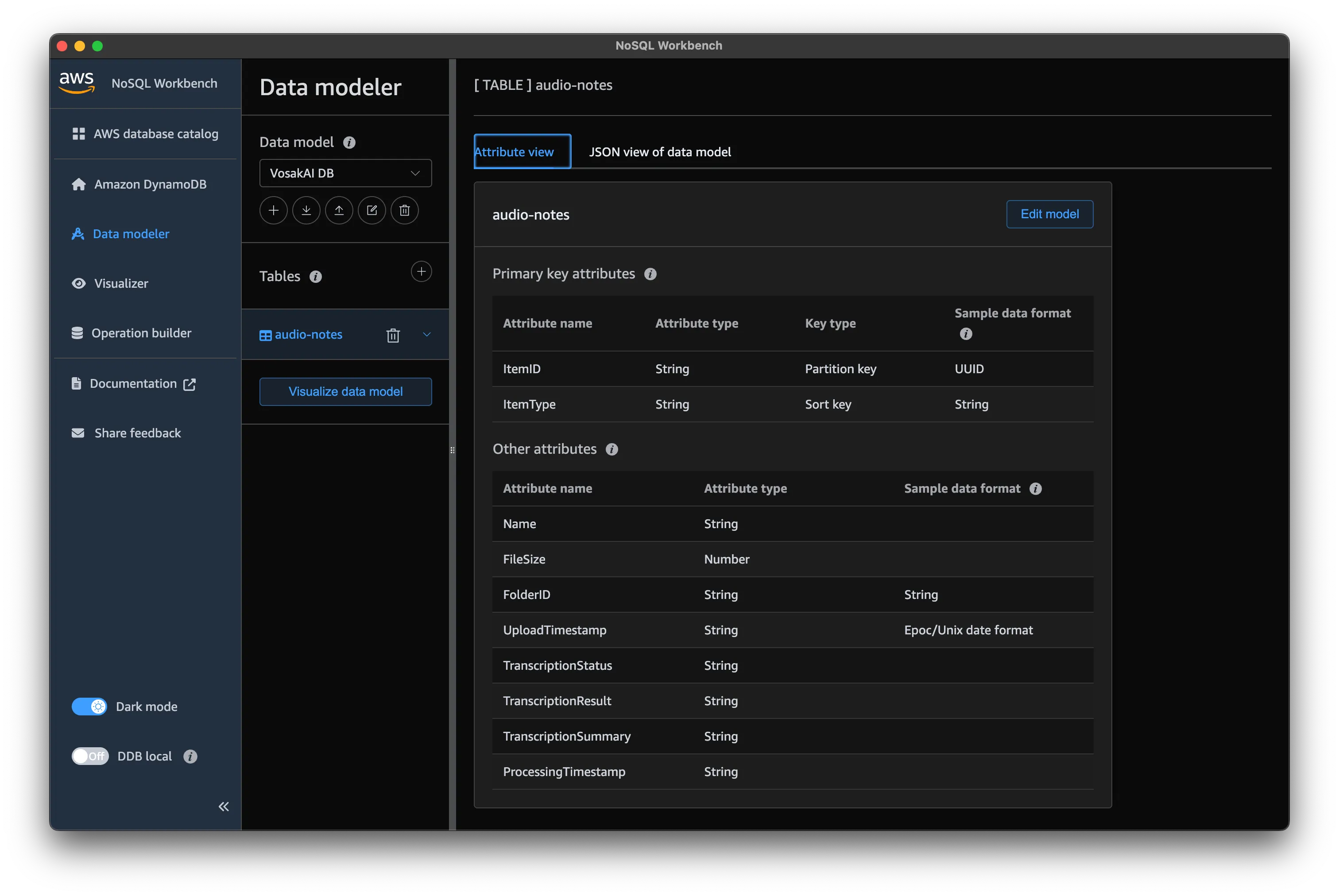
The audio-notes table uses ItemID as the partition key and ItemType as the sort key, with additional attributes for transcription tracking.
Key attributes:
ItemID(UUID) as the partition keyItemType(FILEorFOLDER) as the sort keyTranscriptionStatusasPENDING,IN_PROGRESS,COMPLETED, orFAILEDTranscriptionResultfor the transcribed textFolderIDfor grouping notes by hive
I added a Global Secondary Index called Folder-Contents, partitioned by FolderID, to support querying all notes within a folder.
The schema went through three iterations. The first version did not account for the folder query. The second had the GSI wrong. The third worked. With DynamoDB you need to know your access patterns before you design the table. That is the opposite of how I think coming from relational databases, and it bit me.
This was probably the biggest conceptual shift in the project. In relational systems, I normally reach for normalization first and trust queries to follow. In DynamoDB, access patterns come first, and the table design is shaped around them. It forces a different kind of discipline.
Step 7: API Gateway and the Mobile App
The app needs to fetch notes. I wrote a Lambda that scans the DynamoDB table and returns results, then put API Gateway in front of it.
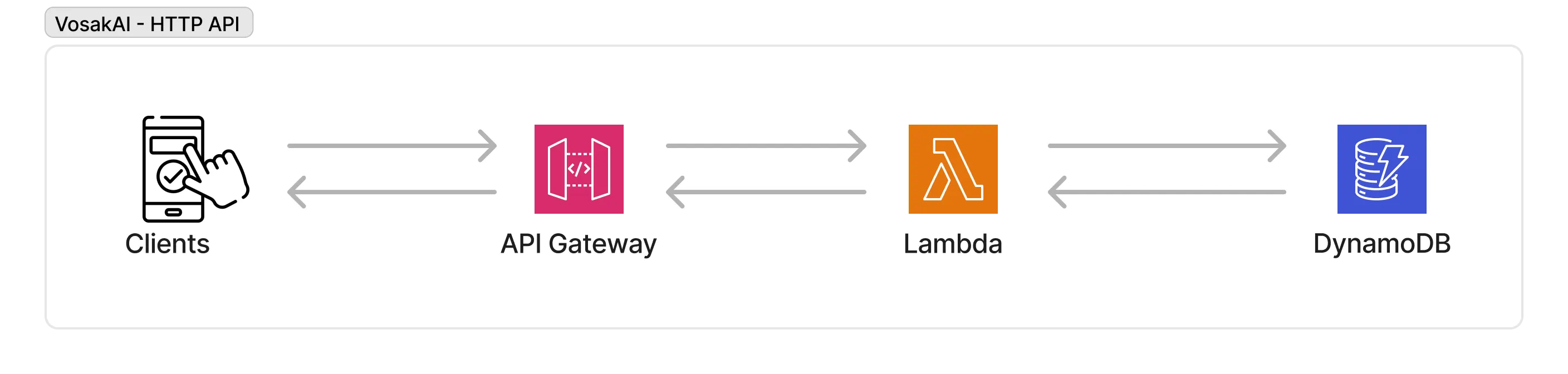
Client to API Gateway to Lambda to DynamoDB. Simple request-response on top of the transcription pipeline.
The API uses a Cognito authorizer. Every request needs a Bearer token from the user’s session. No token, 401.
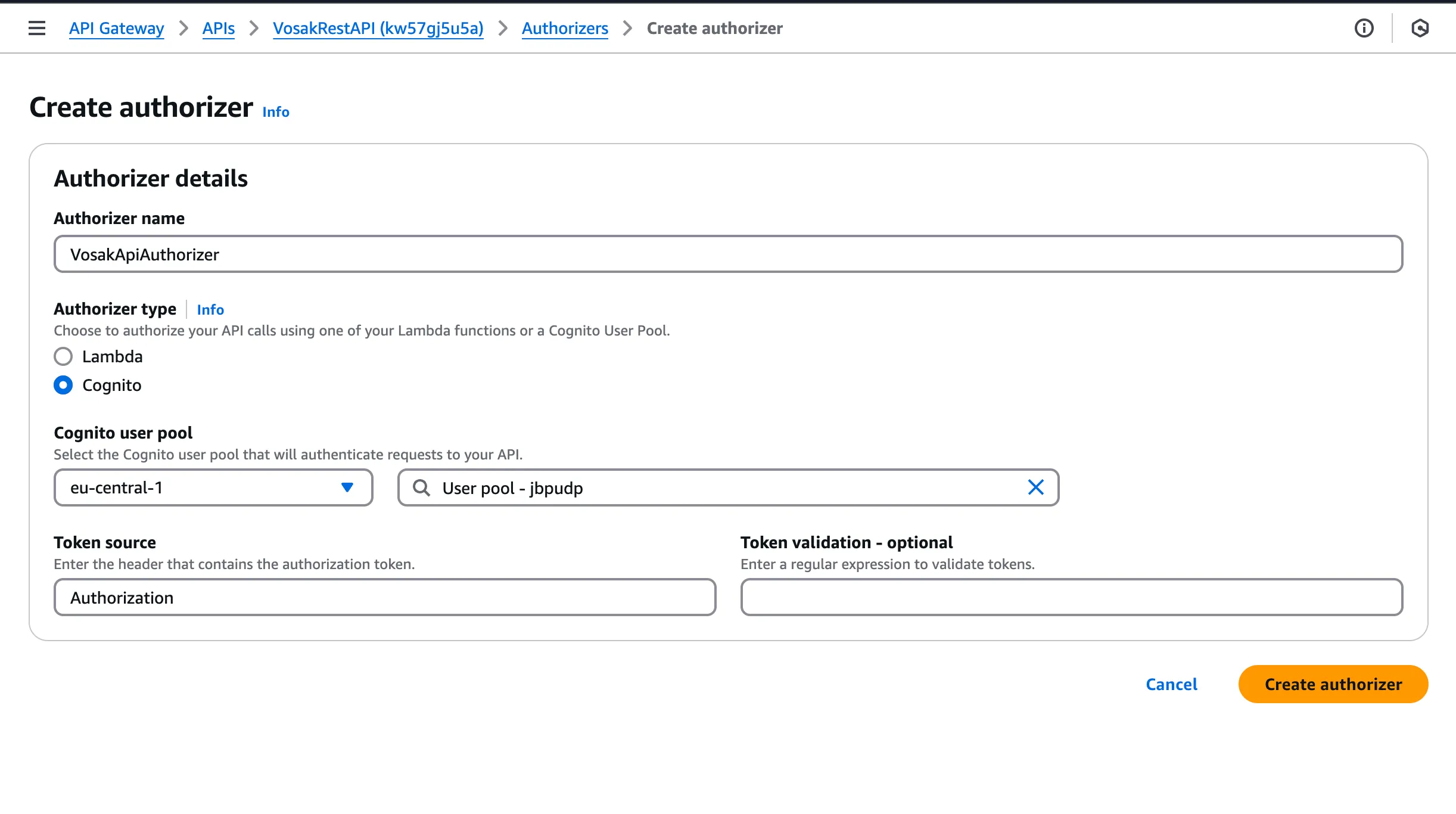
API Gateway method secured with a Cognito authorizer.
On the app side:
const fetchNotes = async () => {
  const session = await fetchAuthSession();
  const token = session.tokens.idToken.toString();

  const response = await get({
    apiName: 'VosakRestAPI',
    path: '/notes',
    options: { headers: { Authorization: `Bearer ${token}` } },
  });

  return response.body;
};
Each note shows its title, transcription preview, upload time, and status such as PENDING or COMPLETED.
The API is intentionally simple. I started with a scan because I wanted the end-to-end system working before optimizing query patterns or pagination. For a side project built to learn AWS service boundaries, that tradeoff was worth it.
Timeline
Four weeks, mostly in morning sessions before my day job.
| Week | What got done |
|---|---|
| 1 (Mar 4-11) | Expo app, Cognito integration, S3 upload |
| 2 (Mar 18-22) | Both Lambdas deployed, DynamoDB schema, transcription pipeline working |
| 3 (Mar 27-28) | API Gateway with Cognito auth, Lambda for listing notes |
| 4 (Mar 29) | Mobile app connected, production demo recorded |
The short calendar span hides the real rhythm of the project. Most sessions were not long, but they were dense. A lot of the progress came from repeatedly closing tiny infrastructure gaps: one missing permission, one wrong trigger prefix, one incorrect table access pattern.
Tools
Cursor handled the React Native and Expo side. I had not done mobile development in years. Cursor let me focus on the architecture, what to build and how the pieces connect, while it handled the Expo Router setup, expo-av recording, and Amplify integration. I got back a specialty I had not touched in a long time without having to re-learn the framework from scratch.
AWS Console handled most of the infrastructure. Lambda deploys went through bash scripts that zipped the code and uploaded via the CLI. Everything else, Cognito, S3, DynamoDB, API Gateway, and triggers, was done in the console.
This combination ended up being ideal for the learning goal. Cursor accelerated the client work enough that I could spend my attention on the AWS side, where I actually wanted the friction because that was where the learning lived.
Lessons
Build something real. I learned more in four weeks of building than in months of certification prep. When I go back to SAA studying, I will know these services from having debugged them at 11pm, not from flashcards.
IAM takes the most time. Every permission error was a twenty-minute detour. Lambda could not write to DynamoDB because of a wrong resource ARN. Lambda could not read from S3 because s3:GetObject was missing. You do not understand IAM until you have fought with it.
Design DynamoDB around queries. I redesigned the table three times because I designed it like a relational database: normalize first, query later. DynamoDB punishes that. List every query the app needs, then build the schema around them.
Serverless breaks in the wiring. Lambda 2 was not firing. The code was fine. The S3 trigger prefix was wrong by one path segment. When debugging event-driven systems, the problem is almost never in the function. It is in the configuration connecting the pieces.
That last lesson is probably the one I will carry into every future AWS project. The hardest bugs were rarely algorithmic. They were integration bugs. A service was configured almost correctly, which in cloud systems often means completely broken.
Closing
This project gave me exactly what I wanted from it. I stopped treating AWS as a list of isolated services and started seeing it as a set of connected building blocks with sharp edges at the boundaries.
If you are learning AWS, I would strongly recommend building something small but end-to-end. Pick a real problem, force yourself to cross service boundaries, and accept that the confusing parts are the point. That is where the understanding shows up.
VosakAI was a voice notes app for a beekeeper. For me, it was a way to turn architecture diagrams into actual experience.
About the author: Mirko Borivojevic is Team Lead & Senior Software Engineer at Hygraph, with 15+ years of experience across startups, biotech, and SaaS companies. He writes about engineering leadership at Behind the notebook.